Overview and Motivation🚦
Modern urban intersections are chaotic environments. My project aims to demonstrate how low-cost embedded systems can contribute to safer and more intelligent intersections.
I created a real time intersection awareness system using the NVIDIA Jetson Orin Nano, a live camera feed from a usb webcam, the YOLOv8 object detection model, a push button for pedestrians, and a set of LED traffic lights. When the system detects a vehicle approaching from the side street, the camera picks it up, the yolo model detects a car, and a state machine triggers a cycle of the intersection. The user can also press a button to simulate a pedestrian requesting to cross.
My motivation for this project came from wanting to re-create a complete AI-driven intersection system using only low-cost hardware and open-source tools—something that simulates real-world infrastructure challenges but is hands-on and understandable at a student level.
The materials used for this project are:
- A Jetson Orin Nano Super Dev Kit
- A USB webcam to watch the intersection
- YOLOv8 real-time object detection
- Push-button input for pedestrian crossing
- LED traffic-light modules
- 330–1kΩ resistors
- Jumper wires + breadboard
- A Python controller that synchronizes everything using shared files
NVIDIA’s Jetson Orin Nano is a compact, power-efficient edge AI computer. It’s powerful enough to run real-time YOLO detection while simultaneously executing hardware control logic, making it ideal for embedded robotics, smart devices, and in this case, a computer vision intersection controller.
Project Setup
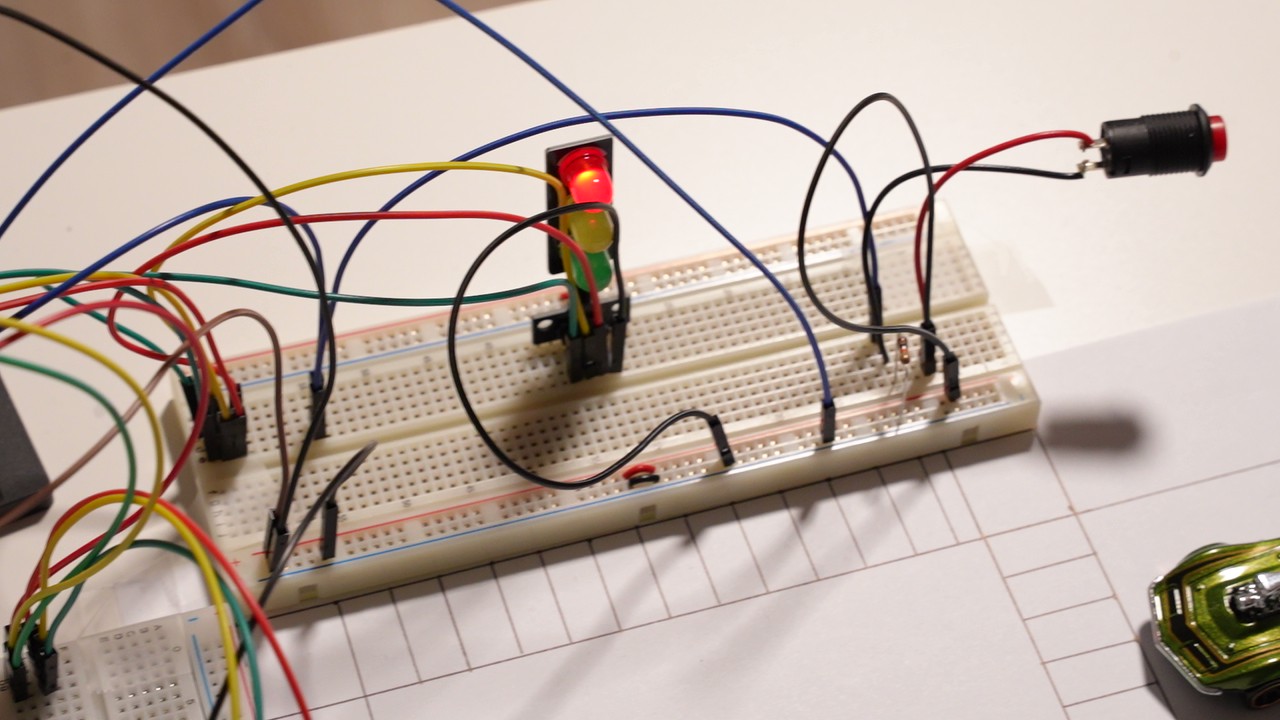
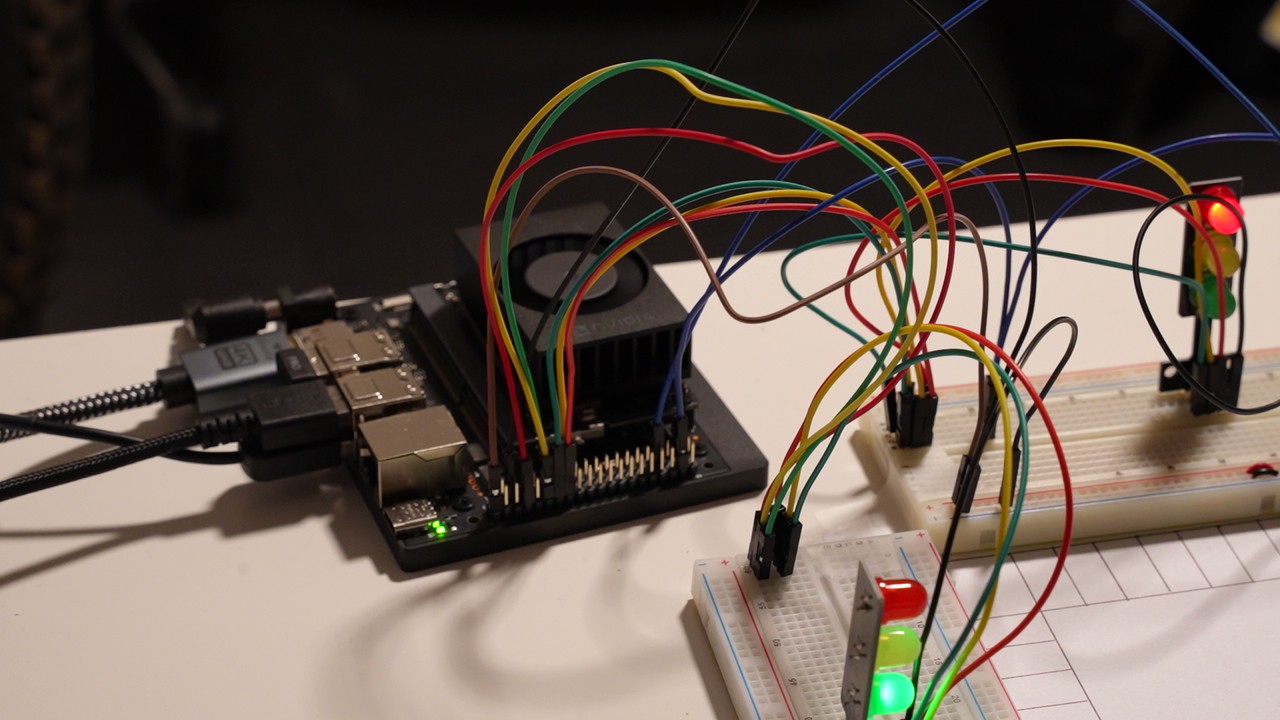
Behavior summary
- When YOLO detects vehicles on the side street, a car request is created. The main road completes the minimum green, then transitions to side green. Side green is extended adaptively while vehicles are present (to a maximum). The main green will not resume until all cars have left the intersection. This improves safety, ensuring the main street cars are not given a green, if other cars are still trying to turn.
- Pedestrian button latches a guaranteed pedestrian time; if cars are present, the pedestrian waits until safe. If the pedestrian initiates the request, the side green is given for a minimum amount of time, longer than the minimum given for a car initiated request, to ensure the pedestrian is given sufficient time to cross.
- Once all cars/pedestrians from the side street are clear of the intersection, the main green will resume, and will remain green until the next request is initiated.
1. System Architecture
The system runs using three cooperating components:
Camera → YOLOv8 Detector → Shared File → Main Intersection Controller → LEDs + Walk Signal
                                      ↑
                           Pedestrian Button (GPIO)
Modules
- Vision Module (
yolo_detect.py)- Reads camera frames
- Runs YOLOv8 inference
- Detects vehicles and updates
side_detected.txt
- Intersection Controller (
main_controller.py)- Reads the shared detection file
- Monitors a pedestrian button
- Drives LEDs indicating whether it’s safe to cross
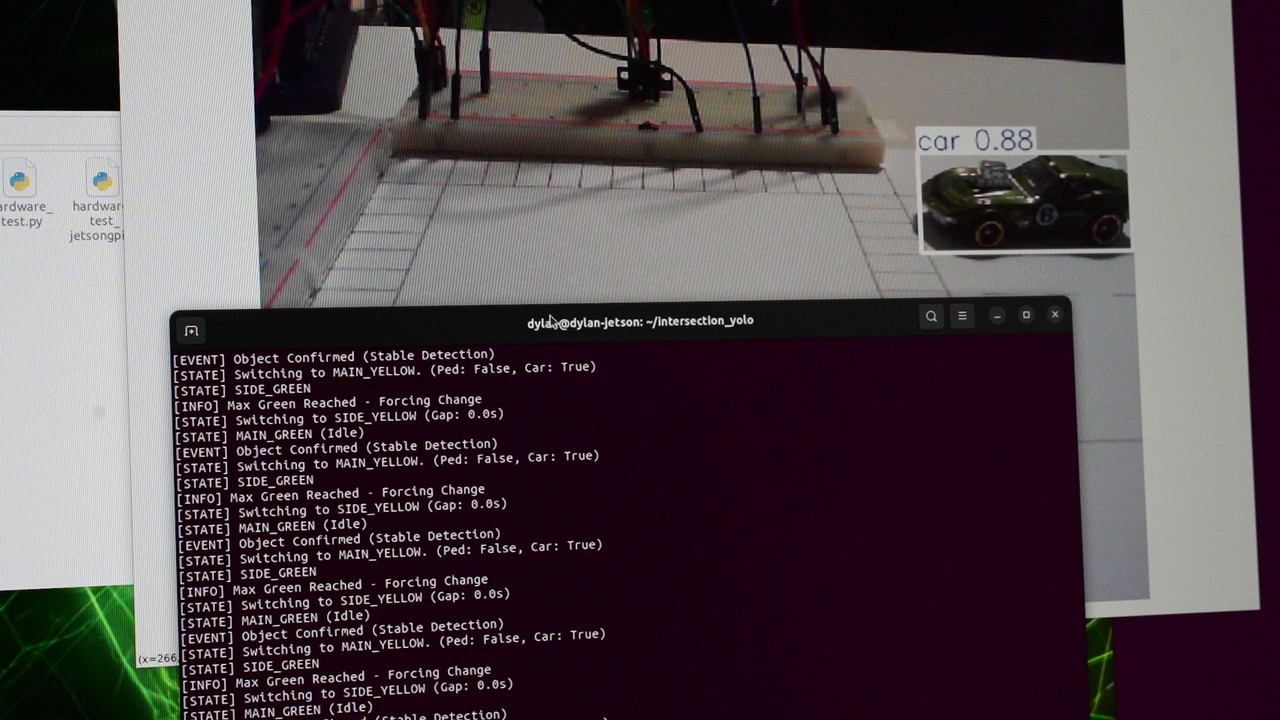
Code — YOLO Detector (yolo_detect.py) (excerpt)
import cv2
import tempfile
import os
from ultralytics import YOLO

MODEL_PATH = "yolov8n.onnx"
SHARED_FILE_PATH = "/tmp/side_detected.txt"
CONFIDENCE_THRESHOLD = 0.45
VEHICLE_CLASSES = [2, 3, 5, 7]  # car, motorcycle, bus, truck

def write_status(detected):
    content = "1" if detected else "0"
    with tempfile.NamedTemporaryFile(mode='w', delete=False, dir='/tmp') as tmp:
        tmp.write(content)
        tmp.flush()
        os.fsync(tmp.fileno())
        tmp_name = tmp.name
    os.replace(tmp_name, SHARED_FILE_PATH)

model = YOLO(MODEL_PATH, task='detect')
cap = cv2.VideoCapture(0)

# Make window resizable
cv2.namedWindow("YOLOv8 Detection", cv2.WINDOW_NORMAL)
cv2.resizeWindow("YOLOv8 Detection", 1280, 720)

while True:
    ret, frame = cap.read()
    results = model(frame, verbose=False, conf=CONFIDENCE_THRESHOLD)
    car_detected = any(int(b.cls[0]) in VEHICLE_CLASSES for b in results[0].boxes)
    write_status(car_detected)
    annotated = results[0].plot()
    cv2.imshow("YOLOv8 Detection", annotated)
    if cv2.waitKey(1) & 0xFF == ord('q'):
        break
cap.release()
cv2.destroyAllWindows()
3. Pedestrian Button Input
Code — Button Reader
import Jetson.GPIO as GPIO
import time

PIN_BUTTON = 37
GPIO.setmode(GPIO.BOARD)
GPIO.setup(PIN_BUTTON, GPIO.IN, pull_up_down=GPIO.PUD_DOWN)

while True:
    print(GPIO.input(PIN_BUTTON))  # 1 = pressed (active-high), 0 = not pressed
    time.sleep(0.1)
4. Main Controller Logic
The controller manages:
- LED traffic lights (Main + Side: R/Y/G)
- Pedestrian requests (latch + guaranteed pedestrian time)
- Vehicle requests from YOLO (latched, adaptive side-green extension)
- Safety phases (yellow + all-red intervals)
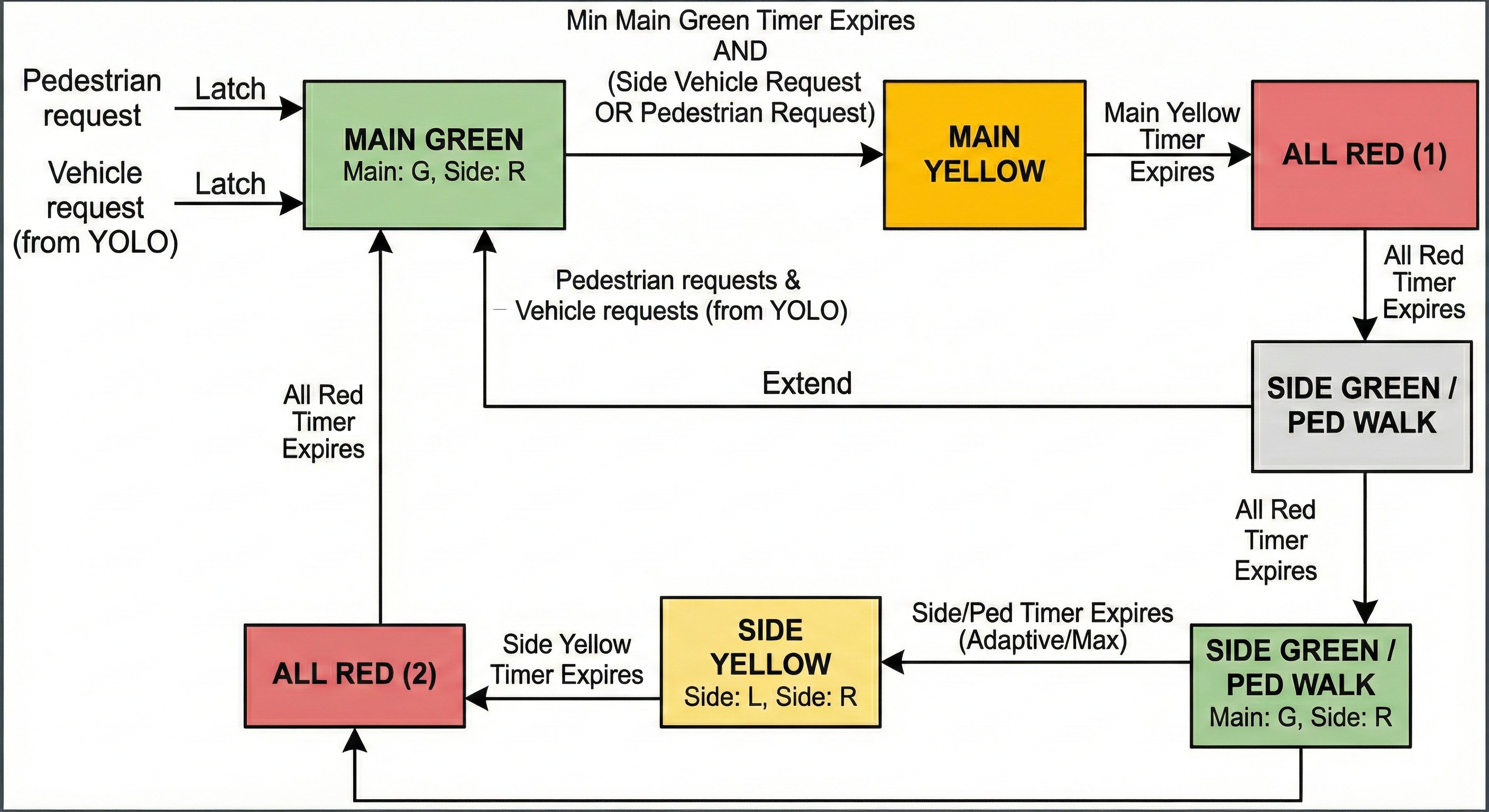
Code — Main Controller (excerpt)
# pin assignments (BOARD numbers)
PIN_MAIN_R = 15
PIN_MAIN_Y = 16
PIN_MAIN_G = 13
PIN_SIDE_R = 7
PIN_SIDE_Y = 11
PIN_SIDE_G = 12
PIN_BUTTON = 22
YOLO_FLAG_PATH = "/tmp/side_detected.txt"

# timing
MIN_MAIN_GREEN = 5.0
MAIN_YELLOW_TIME = 2.0
ALL_RED_TIME = 1.0
SIDE_PED_TIME = 8.0
SIDE_MIN_GREEN = 4.0
SIDE_MAX_GREEN = 15.0

# read YOLO flag
def read_yolo_car_present():
    try:
        with open(YOLO_FLAG_PATH, "r") as f:
            return f.read().strip() == "1"
    except:
        return False
State transition example
if state == "MAIN_GREEN":
    if (req_pedestrian or req_car) and time_in_state >= MIN_MAIN_GREEN:
        state = "MAIN_YELLOW"
        set_lights(0,1,0, 1,0,0)  # main yellow, side red
5. Results & Demo
6. Key Takeaways
Skills & techniques demonstrated:
- Embedded AI on Jetson Orin Nano (YOLOv8, ONNX, TensorRT acceleration)
- Robust GPIO and device-tree handling for custom pinmux needs
- Designing deterministic finite-state machines for timing
- File write communication to allow the programs to talk to each other
- Hardware prototyping: LEDs, resistors, button wiring, circuit diagrams
7. Future Improvements
- Add more cameras for a full intersection system
- Add redundant sensors for safety
- Move detection to shared memory for lower latency
- Add a small pedestrian countdown display
- Improve model accuracy/speed with GPU accelerated optimization